Views: 0 Author: Site Editor Publish Time: 2025-09-22 Origin: Site
When you select a stack flexo printing machine, you need to match its capabilities to your production needs, the types of materials you use, and your budget. A stack flexo printing machine prints on many substrates like paper, plastics, and films. This machine uses flexible plates and works well for packaging, labels, and more. Today, you should look for a stack flexo printing machine that supports water-based inks and has energy-saving features. These trends help you protect the environment and improve efficiency. If you are buying a flexo printing machine, focus on the details that matter most for your business.
Choose a stack flexo printing machine that matches your materials, production volume, and quality needs to get the best results.
Look for machines with water-based ink systems and energy-saving features to protect the environment and reduce costs.
Consider print quality options like 4, 6, or 8-color configurations based on your design complexity and customer expectations.
Select brands with strong reputations and reliable after-sales support to ensure long-term machine performance and service.
Plan for future growth by choosing upgradable machines that allow adding new features and adapting to market changes.
Flexographic printing stands out as a leading method for producing high-quality images on a wide range of materials. You use a flexographic printing machine that relies on flexible photopolymer plates wrapped around cylinders. These plates carry the image and transfer ink directly to the substrate. The process uses water-based, solvent-based, or UV-curable inks, making it adaptable for many applications. Flexographic printing presses work at high speeds and handle both absorbent and non-absorbent surfaces. You can print on paper, plastic films, metallic foils, and even corrugated cardboard.
When you compare flexographic printing to offset or gravure, you see clear differences. Flexographic printing presses use flexible plates and direct ink transfer, while offset presses use aluminum plates and a rubber blanket. Gravure presses use etched metal cylinders. Flexographic printing machines offer lower plate costs and shorter setup times. You get more eco-friendly options, especially with water-based inks. Flexo printing equipment is ideal for packaging, labels, and flexible materials, while offset and gravure focus more on flat or porous surfaces.
Aspect | Flexographic Printing | Offset Printing | Gravure Printing |
|---|---|---|---|
Printing Plates | Flexible photopolymer plates | Aluminum plates | Metal cylinders (intaglio) |
Ink Transfer Method | Direct via anilox roller | Indirect via rubber blanket | Direct from etched cylinder |
Substrate Compatibility | Absorbent and non-absorbent, flexible surfaces | Flat, smooth surfaces | Mostly porous, some flexible |
Ink Types | Water-based, solvent, UV | Water-based, UV | Mostly solvent-based |
Production Speed | High | Moderate | High |
Application Focus | Packaging, labels, flexible packaging | Books, magazines, posters | Magazines, packaging, high-volume |
You will find the flexographic printing press in many industries. The stack flexo printing machine is especially useful for packaging. Its vertical design lets you print on thick materials like corrugated cardboard and kraft paper. This makes it perfect for medium-scale jobs that need sturdy packaging.
Here are some common uses for a flexo printing machine:
Printing on paper bags, wrapping papers, and gift bags
Producing plastic films such as polyethylene, polypropylene, and polyester
Creating laminates and foils for flexible packaging
Making kraft paper bags for heavy-duty and industrial packaging
Printing on corrugated cardboard for boxes and cartons
Industries that rely on flexographic printing presses include food and beverage packaging, consumer goods, industrial packaging, and label production. You also see flexo presses used for folding cartons, shopping bags, envelopes, and specialty items like tissue paper and napkins. Flexographic printing machines handle a wide range of substrates, from thin films to thick boards, making them a top choice for many packaging needs.
Tip: If you need to print on both thin films and thick cardboard, a stack flexo printing machine gives you the flexibility and efficiency you need.
Choosing the right flexo press starts with a clear understanding of your printing needs. You must assess your needs by looking at the materials you plan to print on, the amount of work you expect, and the level of quality your customers demand. Each of these factors plays a big role in flexo press selection and helps you find the best flexo press for your business.
Material compatibility is one of the key considerations when selecting a flexo printing machine. Different substrates—such as paper, plastics, films, and metallic foils—require different handling and ink systems. You need to match the machine’s capabilities to the materials you use most often. For example, films stretch more under tension than paper, and foil can tear more easily. Ink dries faster on paper than on film, so drying technology matters.
Stack flexo printing machines handle a wide range of substrates, including kraft paper, corrugated materials, and plastic films. If you plan to expand your product line in the future, choose a flexographic printing machine that supports both your current and future substrate needs. Machines that print on many types of materials often cost more because they use advanced ink transfer and drying systems, but they give you flexibility for different printing jobs.
Press Type | Compatible Substrates | Supported Ink Types |
|---|---|---|
Inline Flexo Press | PET, PVC, BOPP, self-adhesive | UV, water-based, solvent-based |
Stack Flexo Press | Kraft paper, corrugated, plastic films | Water-based, solvent-based |
Tip: Always check if the flexo printing machine can handle the thickness and weight of your chosen materials. This ensures smooth operation and high print quality.
Production volume affects which flexographic printing machine will work best for you. If you run high-volume printing jobs, you need a flexo press that can keep up with demand. Stack flexo printing machines are designed for wide web applications and can reach speeds up to 500 meters per minute. This makes them ideal for large-scale production and continuous operation.
Production speed varies by model, from 5 to 100 meters per minute for some machines.
Once you set up the flexo press, the process runs automatically, which boosts efficiency.
Flexographic presses require little maintenance and have a long operating life, supporting high-volume needs.
When you plan for growth, think about your current workload and future expansion. If you expect your business to grow, invest in a flexo printing machine that can handle increased production volume without sacrificing quality.
Print quality is a top priority for many businesses. The complexity of your printing jobs and your color requirements will guide your choice of flexographic printing machine. Stack flexo presses deliver sharp, vibrant prints on materials like paper labels, BOPP, PET, PE films, coated paper, and aluminum foil. You can choose from different color configurations based on your customization needs.
Color Configuration | Print Complexity & Color Requirements | Key Advantages | Suitable Applications |
|---|---|---|---|
4-Color (CMYK) | Simple, general printing needs; standard color reproduction | Economical investment; simple operation; stable production; lower failure rates | General packaging, labels, paper products |
6-Color | Moderate complexity; need for spot colors and better brand color matching | Adds 2 spot color units; better color accuracy; no major efficiency loss; easier ink changeovers | Food packaging, plastic labels requiring vibrant and consistent colors |
8-Color | High complexity; high-fidelity printing; extensive Pantone coverage | Consolidates multiple steps into one pass; reduces errors and waste; supports specialty inks | Premium packaging; long runs; high-volume production requiring precise color fidelity |
You should consider the types of printing jobs you handle most often. If you print simple designs, a 4-color flexo press may be enough. For more complex jobs or special brand colors, a 6- or 8-color machine offers better results. Flexographic printing gives you the flexibility to meet a wide range of quality standards, from basic packaging to premium products.
Note: Always match the print quality of your flexo press to your customers’ expectations. This helps you build a strong reputation for reliable, high-quality work.
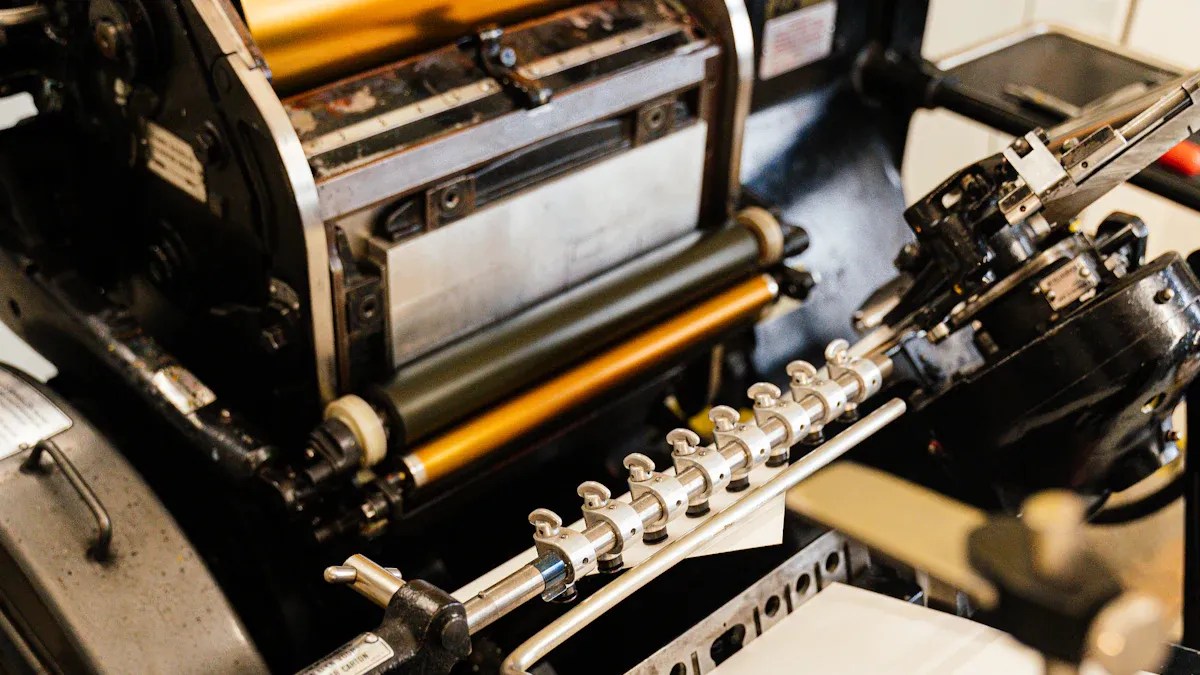
When you look for the best flexo press, speed and efficiency should be at the top of your checklist. Modern stack flexo printing machines can reach impressive speeds. Some models operate at up to 500 meters per minute, which puts them in the same league as high-end central impression presses. This level of high-speed printing lets you handle large orders quickly and meet tight deadlines.
Speed does more than just move jobs faster. It also helps you reduce production costs and increase your output. To get the most from your flexographic printing press, you need to keep the machine in good condition. Regular maintenance of bearings, gears, and transmission systems keeps everything running smoothly. You also need to pay attention to ink viscosity, printing pressure, and the type of anilox roller you use. These factors help you maintain quality at higher speeds.
Here are some ways speed and efficiency affect your flexographic printing operations:
Machine speed increases your production capacity and helps lower costs.
Preventive maintenance ensures your flexo press stays reliable at high speeds.
Operator training and process optimization allow you to maximize both speed and print quality.
Choosing the right materials and consumables supports stable, high-speed production.
If you often run low to medium-speed printing jobs, you can still benefit from the flexibility of stack flexo presses. These machines adapt to different production needs, making them a smart choice for businesses that want to grow.
Water-based ink systems have become a key feature in modern flexographic printing. You should consider these systems if you want to improve efficiency and functionality while protecting the environment. Water-based inks use water as the main carrier, which means they release far fewer volatile organic compounds (VOCs) than solvent-based inks. This makes your workplace safer and helps you meet environmental standards.
When you print on paper or cardboard, water-based inks work especially well. The porous nature of these substrates allows the ink to penetrate and anchor, resulting in sharp, vibrant prints. You also save on emission taxes and waste treatment costs because water-based inks are less harmful to the environment.
Benefits of water-based ink systems include:
Lower VOC emissions, which reduce air pollution and improve workplace safety.
Comparable or better energy use for drying, especially on paper substrates.
Easier compliance with environmental and safety certifications.
Lower costs for safety equipment and emission controls.
If you want your flexographic printing press to stand out as the best flexo press for eco-conscious clients, water-based ink systems are a must-have feature.
Energy-saving and low-noise design features set modern flexo printing machinery apart. You can find machines that use UV/LED curing systems, which cut energy use by up to 80% compared to traditional thermal curing. These systems also reduce carbon dioxide emissions and make your operation greener.
Other energy-saving features include all-servo drive systems and advanced tension controls. These technologies help you reduce waste and keep your production line running smoothly. Shorter web paths and the removal of central impression drums also lower energy use and cut down on cleaning time.
Noise reduction is another important feature. Stack flexo printing machines now use sound attenuation devices like fan enclosures and silencers. These features make your workplace quieter and safer. Operators can talk at normal levels, which improves communication and reduces stress. Lower noise levels also help you meet OSHA standards and protect your team from hearing loss.
Tip: Choosing a flexo press with energy-saving and low-noise features not only helps the environment but also creates a better workplace for your staff.
Print accuracy is a critical feature in any flexographic printing press. Advanced stack flexo presses use differential gears and precise register adjustment systems. These features let you control the position of each color with great accuracy, even at high speeds.
Some machines achieve registration accuracy within ±0.3 mm (300 microns), while others use vision cameras and fiber optic sensors for even finer control. These systems help you avoid errors caused by mechanical backlash, substrate stretching, or web tension changes.
Key features that improve print accuracy include:
360-degree rotary registration with PLC and touch screen controls.
Planetary gear mechanisms for stable operation and easy plate changes.
Phase fixing systems that keep gear positions steady during long runs.
Electric left-right adjustment and phase zero devices for consistent slot positioning.
With these features, you can deliver high-quality prints every time. Multi-color printing capabilities also let you handle complex jobs with ease, making your flexo press a versatile tool for many applications.
Note: When you choose flexo printing machinery with advanced accuracy features, you ensure your products meet the highest quality standards and satisfy your customers.
When you plan to buy a stack flexo printing machine, you need to look at the initial investment. The price depends on the type of machine, the number of color stations, and the level of automation. Entry-level mid-web stack flexo machines with 2-4 colors usually cost between $20,000 and $65,000. High-end models with 6-8 or more colors can range from $90,000 to over $320,000. Some specialized or highly automated machines may even reach $2 million or more.
You should consider your production needs and future growth when deciding how much to invest. A quality piece of machinery may cost more at first, but it often brings better performance and reliability.
After you buy your flexo press, you will face ongoing operating costs. These costs include several main components:
Maintenance and Repairs: You need to clean, lubricate, and replace worn parts regularly. Good maintenance prevents expensive breakdowns.
Energy Consumption: Motors, heaters, and lights use a lot of energy. Choosing energy-saving models and using efficient practices can lower your bills.
Consumables (Inks): Ink is a major expense. Water-based inks are often more affordable and safer for the environment. Using the right settings and keeping your machine in good shape helps you use less ink.
Tip: Features like frequency control and automatic lubrication can reduce both energy and maintenance costs over time.
You want your investment to pay off in the long run. Reliable machines help you avoid costly downtime and repairs. When you choose a machine from a reputable manufacturer, you get better support and access to spare parts. This reliability means you can take on more jobs and deliver consistent print quality. Water-based inks and energy-saving features also lower your long-term costs by reducing power use and maintenance needs. Preventative care, such as regular inspections and cleaning, keeps your machine running smoothly and protects your profits.
Remember: A reliable, high-quality machine not only saves money but also helps you grow your business by meeting customer demands and opening new market opportunities.
When you choose a stack flexo printing machine, you should look at the manufacturer's reputation. A strong reputation means you can trust the machine's quality and the company's support. You can use several criteria to judge a brand:
Proven reliability and financial stability
Leadership in technology and innovation
Commitment to eco-friendly practices and Industry 4.0 standards
High engineering quality and automation features
Comprehensive after-sales support and global service network
Fast delivery of spare parts from local warehouses
Operator and maintenance training programs
Some brands stand out in the global market for their quality and reliability. For example, Bobst, Heidelberger Druckmaschinen, Windmöller & Hölscher, Mark Andy, Uteco, and Comexi have earned strong reputations. These companies lead with advanced automation, precise registration, and high-resolution printing. The table below highlights key strengths:
Brand | Key Strengths and Quality Indicators | Reliability Factors and Market Recognition | Notable Features and Applications |
|---|---|---|---|
Bobst | European engineering, smart automation | Global reach, preferred for packaging | Inline inspection, high-speed packaging lines |
Heidelberger | German innovation, eco-efficient | Print precision, Industry 4.0 integration | Retail packaging, eco-friendly sectors |
Mark Andy | Fast makeready, wide substrate compatibility | Flexible solutions, reliable service | Folding cartons, labels, flexible packaging |
Uteco | High-speed, green technology | Focus on sustainability, industrial scale | Extra-wide web, flexo and gravure combination |
Tip: Always research different models and compare brand reputations before making your decision.
After-sales service plays a big role in your long-term success. You need support that keeps your machine running and your business moving. The most valued services include:
Spare parts supply with global logistics to reduce downtime
24/7 remote technical support and diagnostics for fast troubleshooting
Preventive maintenance programs to keep print quality high
On-site emergency repairs for quick recovery
Operator and technical training to improve skills
Upgrades and software updates to boost productivity
Local service availability and ISO 9001 certification for reliability
Quick access to technical support and spare parts helps you avoid long delays. Ongoing training and flexible maintenance plans also help you maintain uptime and extend your machine's life.
Note: Reliable after-sales service ensures you get the most value from your investment.
Upgradability gives your business flexibility and helps you stay competitive. You can extend your machine's service life and adapt to new market demands by upgrading key components. Common upgrade options include:
Integration of automation technologies like servo-driven drives and automated washing systems
Use of advanced consumables such as LED inks and laser-engraved anilox rollers
Modular press designs for easy customization and future expansion
Addition of digital printing units for hybrid production
Operator training on new features and maintenance routines
Modern stack flexo presses let you add features like digital printing, variable data, and finishing systems. These upgrades improve print quality, efficiency, and cost-effectiveness. Regular maintenance and training support long-term performance and business growth.
Callout: Upgradable machines help you adapt quickly to changing customer needs and industry trends.
Choosing the right stack flexo printing machine helps you meet your business goals and match your production needs. You should look at features, costs, and support from the manufacturer. This approach gives you long-term value and better results. Think about your needs for print quality and environmental protection. If you want the best fit, talk with experts or trusted manufacturers for advice tailored to your situation.
You can print on many materials, such as paper, plastic films, metallic foils, and corrugated cardboard. Always check your machine’s specifications for supported thickness and material types.
Water-based inks help you reduce air pollution and improve workplace safety. You also meet environmental standards more easily. These inks work well on paper and cardboard.
You should perform basic cleaning and checks daily. Schedule deeper maintenance, such as lubrication and part replacement, every few months. Regular care keeps your machine running smoothly.
Yes, you can add features like automation, new color units, or digital modules. Upgradable machines help you adapt to new market needs and improve efficiency.
Machine size, number of color stations, automation level, and brand reputation all impact price. Consider your production needs and long-term goals before making a purchase.